طريقة حرق نسخة ويندوز على الفلاش

طريقة حرق نسخة ويندوز على الفلاش

سنذكر برنامجين من أسهل البرامج في المجال واضمنها:

  • برنامج ريفوس يقوم بحرق نسخة واحدة فقط على الفلاش.

رابط البرنامج 

البرنامج مجاني بشكل كامل ويقوم بعمل نسخة مثالية على الفلاش بدون اي تعقيدات.

طريقة عمل البرنامج سهلة جدا أول ما يتم فتحه يظهر بهذه الطريقة:
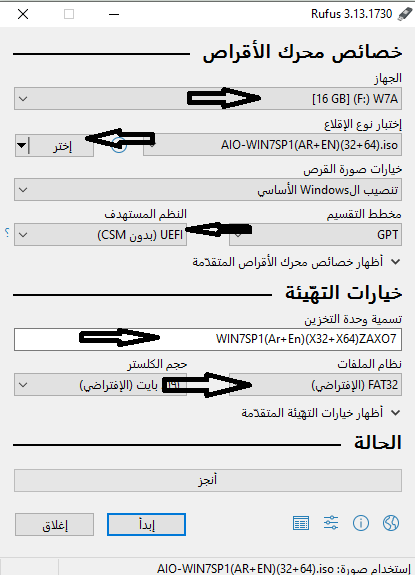
الخيارات كالتالي:

اولا تختار الفلاش الذي تريد حرق النسخة عليه.

ثانيا: تختار ملف الايزو الخاص بالويندوز والبرنامج يقوم بحرق جميع الاصدارات سواء اكس بي او 7 او 8 او 10.

ثالثا: تختار نوعية نظام الهارد الخاص بالجهاز أو تدعه كما هو وهو الافضل.

رابعا: تسمية الفلاش.

خامسا: اختيار فورمات الفلاش: نظام fat سهل في التثبيت على اغلب الاجهزة ولكنه ليس سريع في النسخ والتثبيت، والنظام NTFS هو الاسرع وفي حال اخترت نسخة حديثة يقوم البرنامج باختيار الافضل تلقائيا.

سادسا: البدء بالحرق والانتظار حتى يتنهي .

ويمكن بعد ذلك استخدام الفلاش للتثبيت بسهولة.

  • برنامج win setup from usb:

البرنامج يقوم بحرق أكثر من نسخة على فلاشة واحدة.

رابط البرنامج

البرنامج مجاني بالكامل ورابط التحميل من الموقع الرسمي مباشرة، بعد تنزيل البرنامج يتم فتح الضغط عنه في ملف وبعد ذلك يتم فتح الملف وتجد فيه ملفين واحد لنسخ ويندوز (32)WinSetupFromUSB_1-9، والأخر (64) WinSetupFromUSB_1-9_x64، تختار النسخة التي تناسب جهازك وبعد ذلك يفتح البرنامج هكذا:
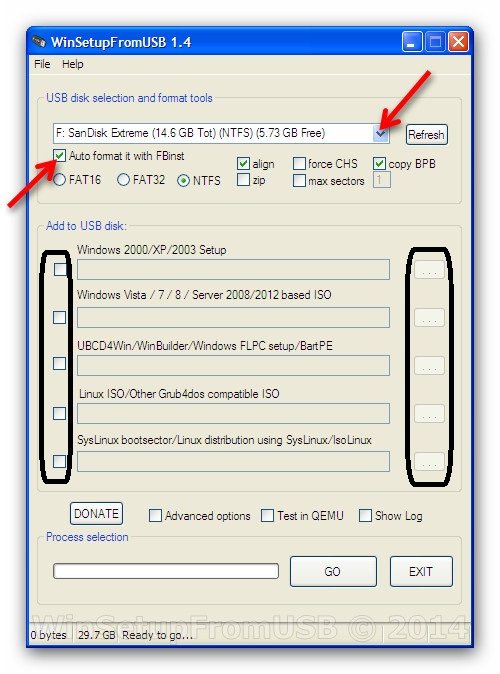
الواجهة واضحة وسهلة جدا: أولا يتم تحديد الفلاش ويمكنك تحديد نوع الفورمات وخيارات اخرى ويمكن جعله تلقائي، وبعد ذلك لديك خيارات لحرق عدة أنواع من الانظمة وفي حال الرغبة بحرق اكثر من نسخة في نفس الوقت يتم تحديد النسخ التي تريد حرقها في الخانات المحددة وحرق النسخ، ويمكن ايضا حرق النسخة بالتدريج:

تبدا بحرق نسخة ووقت الحرق الأول تختار auto format من أجل عمل فورمات للفلاش وفي حال رغبت بحرق نسخة أخرى تلغي الصح من auto format وعمل عدد النسخ التي تريد.

ملاحظة: عند اختيار النسخة التي تريد حرقها تظهر لك نافذة كهذه:
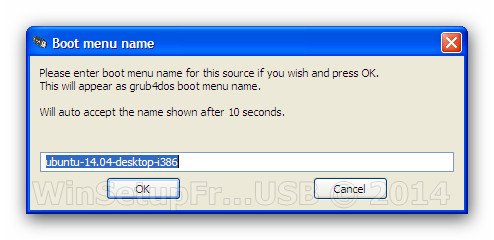
هذه النافذة لتغيير اسم النسخة التي تظهر وقت عمل الفورمات في حال رغبتك بتسمية النسخ التي في الفلاش والنافذة تظهر لمدة 10 ثواني فقط.


by

Tags:

Comments

24 رداً على “طريقة حرق نسخة ويندوز على الفلاش”

  1. الصورة الرمزية لـ how to fake proof of permanent residency

    Fine way of explaining, and nice article to take data concerning my presentation subject matter, which i am going to deliver in university.

  2. الصورة الرمزية لـ магазин бисера минск

    Hi! I just would like to give you a huge thumbs up for the great info you have here on this post. I’ll be coming back to your blog for more soon.

  3. الصورة الرمزية لـ daachka.ru

    I all the time used to read article in news papers but now as I am a user of web so from now I am using net for articles, thanks to web.

  4. الصورة الرمزية لـ yes-dacha.ru

    Thank you for some other fantastic article. Where else may just anyone get that kind of information in such a perfect way of writing? I have a presentation next week, and I am at the look for such information.

  5. الصورة الرمزية لـ rem-dom-stroy.ru

    My coder is trying to persuade me to move to .net from PHP. I have always disliked the idea because of the expenses. But he’s tryiong none the less. I’ve been using Movable-type on several websites for about a year and am nervous about switching to another platform. I have heard excellent things about blogengine.net. Is there a way I can transfer all my wordpress content into it? Any kind of help would be really appreciated!

  6. الصورة الرمزية لـ obshchestroy.ru

    Have you ever thought about publishing an e-book or guest authoring on other websites? I have a blog centered on the same ideas you discuss and would really like to have you share some stories/information. I know my viewers would value your work. If you are even remotely interested, feel free to send me an e-mail.

  7. الصورة الرمزية لـ remont-master-info.ru

    Hi! I know this is kinda off topic nevertheless I’d figured I’d ask. Would you be interested in exchanging links or maybe guest writing a blog article or vice-versa? My site discusses a lot of the same subjects as yours and I feel we could greatly benefit from each other. If you happen to be interested feel free to send me an e-mail. I look forward to hearing from you! Superb blog by the way!

  8. الصورة الرمزية لـ аренда офиса в минском районе

    Hi there! I’m at work browsing your blog from my new iphone! Just wanted to say I love reading your blog and look forward to all your posts! Keep up the fantastic work!

  9. الصورة الرمزية لـ Jurist

    Excellent blog! Do you have any helpful hints for aspiring writers? I’m planning to start my own site soon but I’m a little lost on everything. Would you suggest starting with a free platform like WordPress or go for a paid option? There are so many choices out there that I’m totally confused .. Any recommendations? Many thanks!

  10. الصورة الرمزية لـ Jurist

    You really make it seem so easy with your presentation however I in finding this topic to be really something which I think I would never understand. It kind of feels too complicated and very wide for me. I am taking a look forward on your next submit, I will try to get the hold of it!

اترك تعليقاً

لن يتم نشر عنوان بريدك الإلكتروني. الحقول الإلزامية مشار إليها بـ *